How to Pair Bluetooth Headphones (Step-by-Step Guide for All Devices)

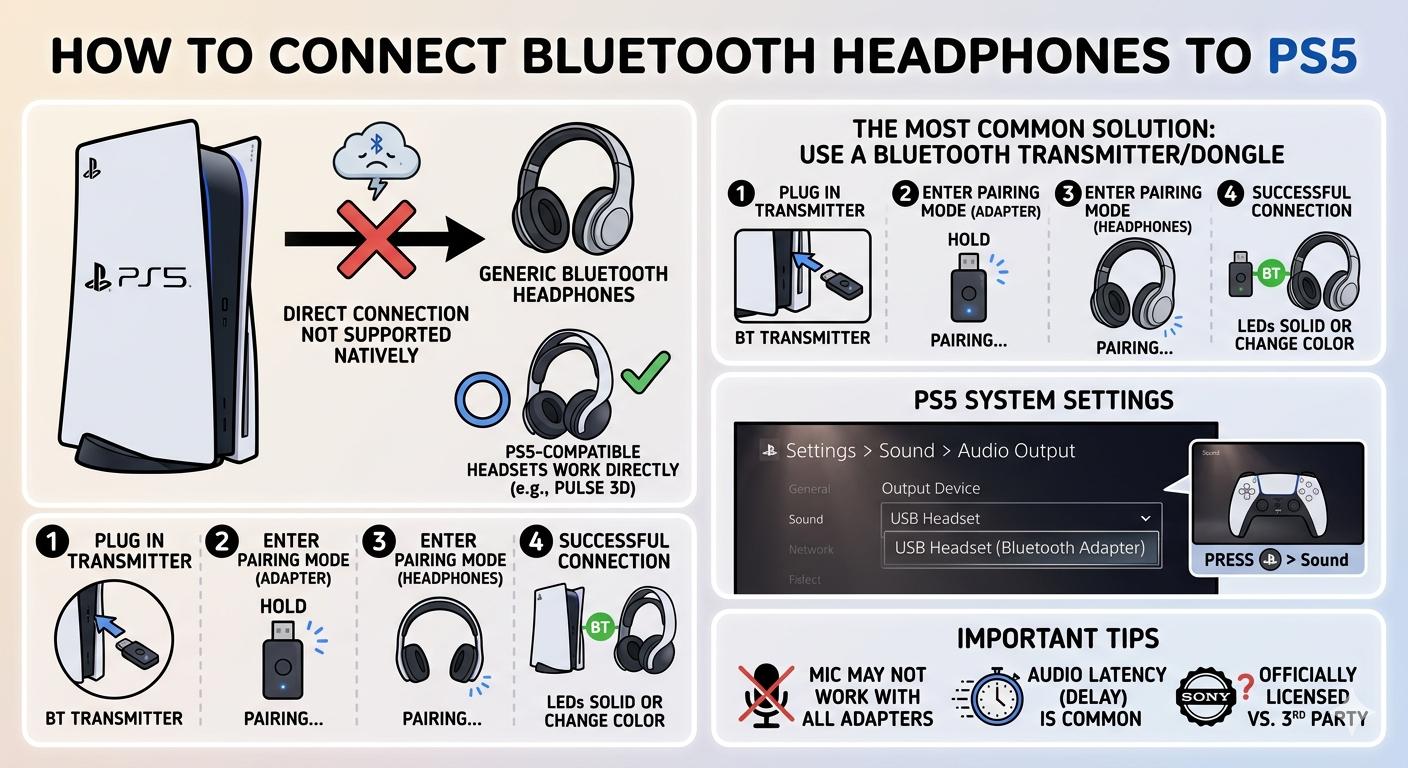
How to Pair Bluetooth Headphones (Step-by-Step Guide for All Devices) Introduction Bluetooth headphones have become an essential part of everyday life, whether for listening to music, attending online classes, or working remotely. However, many people still struggle with one simple question: how to pair Bluetooth headphones correctly. The process is usually straightforward, but it can vary slightly depending on the device you are using. In this guide, you will learn how to connect your Bluetooth headphones to different devices, understand common issues, and find practical solutions. What Does Pairing Bluetooth Headphones Mean? Pairing is the process of connecting your Bluetooth headphones to another device, such as a smartphone or computer, without using cables. Once the pairing is completed successfully, both devices can communicate wirelessly. In most cases, pairing only needs to be done once. After that, your headphones will automatically reconnect to the last paired device when both are turned on. How to Put Bluetooth Headphones in Pairing Mode Before connecting your headphones to any device, you need to activate pairing mode. This step is essential because your device will not detect the headphones otherwise. Most Bluetooth headphones enter pairing mode by pressing and holding the power button for a few seconds. You will usually notice a blinking light, often blue or red, indicating that the headphones are ready to connect. Some models include a separate pairing button, so if you are unsure, it is always a good idea to check the user manual. How to Pair Bluetooth Headphones with an Android Phone To connect your headphones to an Android device, follow these steps: Open the Settings application Tap on Bluetooth Turn Bluetooth on Select the option to pair a new device Choose your headphones from the list of available devices Once selected, your headphones should connect within a few seconds. How to Pair Bluetooth Headphones with an iPhone Pairing with an iPhone is just as simple: Go to Settings Tap on Bluetooth Turn Bluetooth on Wait for your headphones to appear under available devices Tap on the name of your headphones to connect After successful pairing, the status will change to "Connected." How to Pair Bluetooth Headphones with a Windows PC If you are using a Windows laptop or desktop, follow these steps: Click on the Start menu Open Settings Navigate to Devices Select Bluetooth and other devices Click on Add a Bluetooth device Choose your headphones from the list Once connected, you can start using your headphones immediately. How to Pair Bluetooth Headphones with a Mac For Mac users, the process is slightly different: Click on the Apple menu Open System Settings Select Bluetooth Turn Bluetooth on Locate your headphones and click Connect Your headphones will now be ready to use. How to Pair Bluetooth Headphones with a Smart TV Many modern smart TVs support Bluetooth connectivity. To pair your headphones: Open the TV settings menu Navigate to sound or audio settings Select Bluetooth devices Choose the option to add a new device Select your headphones from the list This allows you to listen privately without disturbing others. How to Pair Bluetooth Headphones with a Gaming Console Connecting Bluetooth headphones to gaming consoles like PlayStation can be more complicated. Most consoles do not support direct Bluetooth audio connections. One common solution is to use a Bluetooth adapter. You can plug the adapter into the console, then pair your headphones through it. Another option is to connect your headphones to your TV instead of the console. How to Reconnect Bluetooth Headphones After pairing your headphones once, reconnecting them becomes much easier. In most cases, you only need to turn on Bluetooth on your device and power on your headphones. They should automatically reconnect. If they do not, simply select them from the list of previously paired devices. Common Problems and Their Solutions Even though pairing is simple, users often face a few common issues. If your headphones are not showing up, make sure they are in pairing mode. Restarting Bluetooth on your device can also help. If your headphones are already connected to another device, they may not appear in the list. Turn off Bluetooth on other devices or reset your headphones. If the connection keeps dropping, check the distance between your device and headphones. Bluetooth usually works best within a range of about ten meters without obstacles. How to Reset Bluetooth Headphones If you are unable to connect your headphones despite trying all solutions, resetting them may help. Most headphones can be reset by pressing and holding the power button for around ten to fifteen seconds. This clears previous connections and restores the device to its default settings. After resetting, you will need to pair the headphones again. Tips to Improve Bluetooth Performance To get the best experience from your Bluetooth headphones, keep a few things in mind. Try to keep your device close to your headphones. Avoid physical obstacles such as walls, as they can weaken the signal. Make sure your headphones are fully charged, as low battery levels can affect performance. Keeping your device’s software updated can also improve connectivity and sound quality. Choosing the Right Bluetooth Headphones If you are still not satisfied with your current headphones, it may be time to consider a better option. For users in Pakistan, there are many budget-friendly choices available. You can find reliable wireless headphones under different price ranges, depending on your needs. When selecting headphones, consider factors such as battery life, sound quality, comfort, and brand reliability. Conclusion Understanding how to pair Bluetooth headphones is a basic but important skill in today’s digital world. Whether you are using a phone, computer, or television, the process follows the same general steps. Once you learn how pairing works, it becomes quick and effortless. If you face any issues, simple troubleshooting steps can usually solve the problem. With the right approach, you can enjoy a smooth and wireless listening experience without any complications. Frequently Asked Questions Why are my Bluetooth headphones not connecting? This usually happens when the headphones are not in pairing mode or are already connected to another device. Can Bluetooth headphones connect to multiple devices at the same time? Some advanced models support this feature, but most standard headphones connect to one device at a time. Do I need an internet connection to pair Bluetooth headphones? No, Bluetooth works independently of the internet.

Introduction How to Pair Bluetooth Headphones (Step-by-Step Guide for All Devices) Bluetooth headphones have become an essential part of everyday life, whether for listening to music, attending online classes, or working remotely. However, many people still struggle with one simple question: how to pair Bluetooth headphones correctly. The process is usually straightforward, but it can … Read more

Web of Science: The Complete Guide for Researchers, Students & Academics

Web of Science: The Complete Guide for Researchers, Students & Academics

Web of Science: The Complete Guide for Researchers, Students & Academics(WoS) is one of the world’s most trusted research databases, widely used by students, scholars, universities, and scientists across the globe. It provides access to high-quality journals, conference papers, books, citations, and impact factors. Whether you are writing a research paper, analyzing citations, or searching … Read more

What Colors Make Green? A Complete Guide to Mixing the Perfect Shade

What Colors Make Green

Introduction Have you ever wondered what colors make green? Whether you’re painting, designing, or decorating, understanding how green is made can completely change how you approach color. Green is one of the most vibrant and versatile colors — symbolizing nature, freshness, and growth. In this guide, we’ll break down exactly what colors make green, how … Read more

Sprunki Coloring Pages: A Creative Way to Relax, Learn, and Have Fun

Sprunki Coloring Pages

Coloring has always been one of the simplest yet most powerful ways to express creativity, relieve stress, and explore imagination is Sprunki Coloring Pages. In recent times, Sprunki Coloring Pages have become a huge trend among both kids and adults who love interactive art. These pages are inspired by the popular Sprunki universe a colorful … Read more

Engage Study Activate (ESA) Teaching Method: A Complete Guide

engage study activate

Introduction Teaching in the 21st century requires methods that go beyond memorization and rote learning. Students today learn best when they are actively involved in the process, motivated, and given the chance to apply knowledge practically. One widely recognized approach that fulfills these needs is the Engage Study Activate (ESA) method. Developed by Jeremy Harmer, … Read more

Understanding the Educators Handbook: A Vital Tool in Modern Education

Educators Handbook

In the evolving landscape of K–12 education, Educators Handbook managing student behavior. Learn how it helps teachers document incidents, analyze data, implement positive interventions, and improve communication with parents and administrators.” maintaining consistency, transparency, and efficiency in managing student behavior is paramount. The Educator’s Handbook, developed by EducatorsHandbook.com, serves as a comprehensive solution to these … Read more